For a 5 minute guide on how to modify a simple contract, see our Quickstart.
In this more advanced section, we'll go through how to modify contracts on your shadow fork that use design patterns that are commonly found in the wild:
Shadowing proxy contracts that delegate call to implementation contracts.
Using oracles on your shadow fork to get token prices in USD, without using offchain price APIs.
Shadowing a factory contracts and applying modifications to all child contracts it has created.
that call new functions from another shadow contract.
Factory contracts are a widely used pattern across DeFi in DEXs, lending pools, and yield vaults.
A factory is a contract that can deploy multiple instances of the same contract — we call these child contracts.
Generally, child contracts share the same functionality, but are typically initialized with different constructor arguments, which may alter the child contract’s runtime bytecode. Factory contracts are widely used across many protocols, including Uniswap, Compound, and Pendle – for example, there are 300K+ Uniswap V2 pools deployed by one factory contract.
Shadowing each pool contract individually would be a highly tedious and impractical process. Shadow provides powerful features that allow you to make one set of changes to a factory contract and link all of its child contracts to those changes.
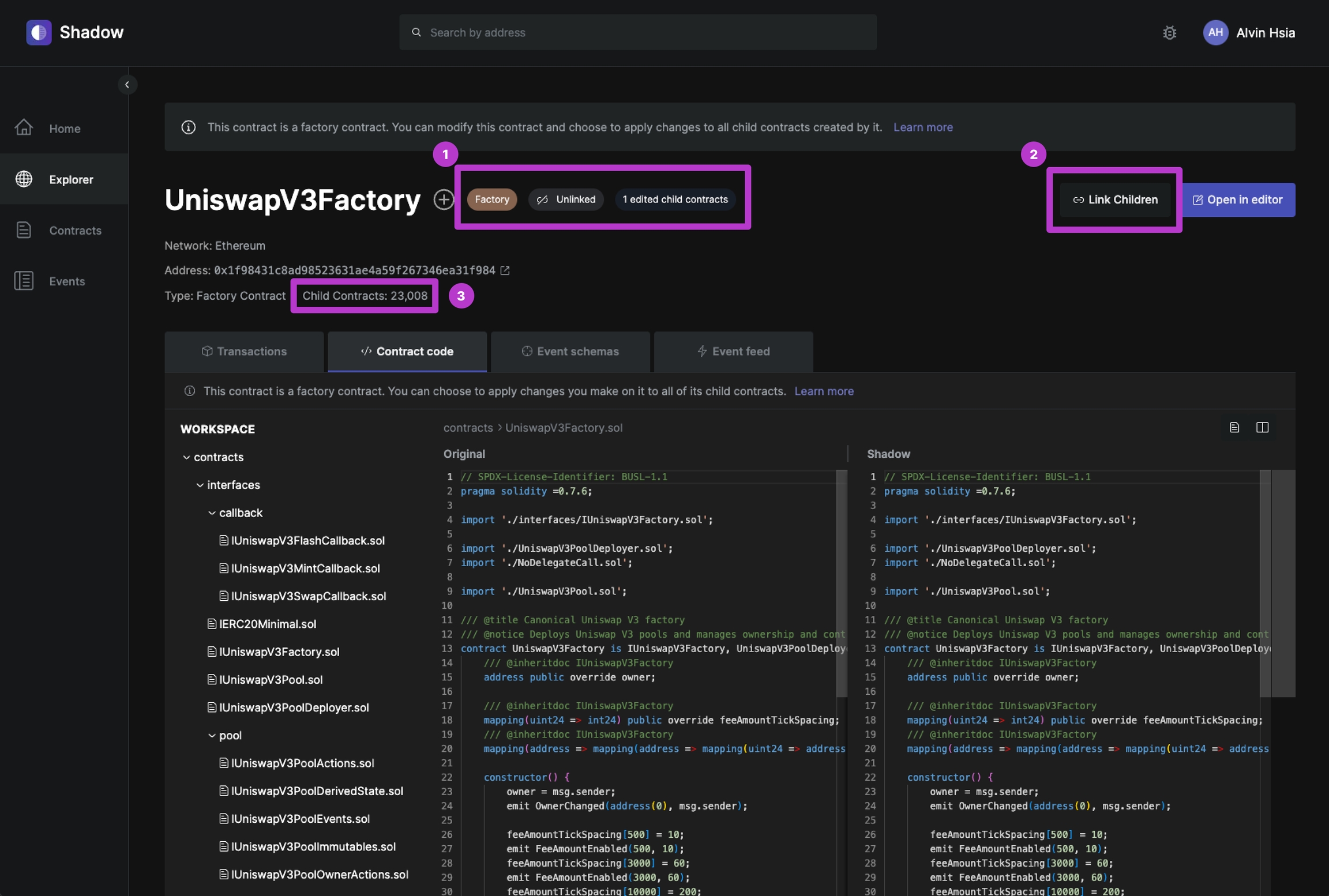
Shadow automatically detects if a contract is a factory contract, or a child contract deployed by a factory contract. On the contract page, you will:
See indicators that tell you:
That this is a factory contract
If the factory contract is current linked with all of its child contracts
The number of separately edited child contracts on your shadow fork
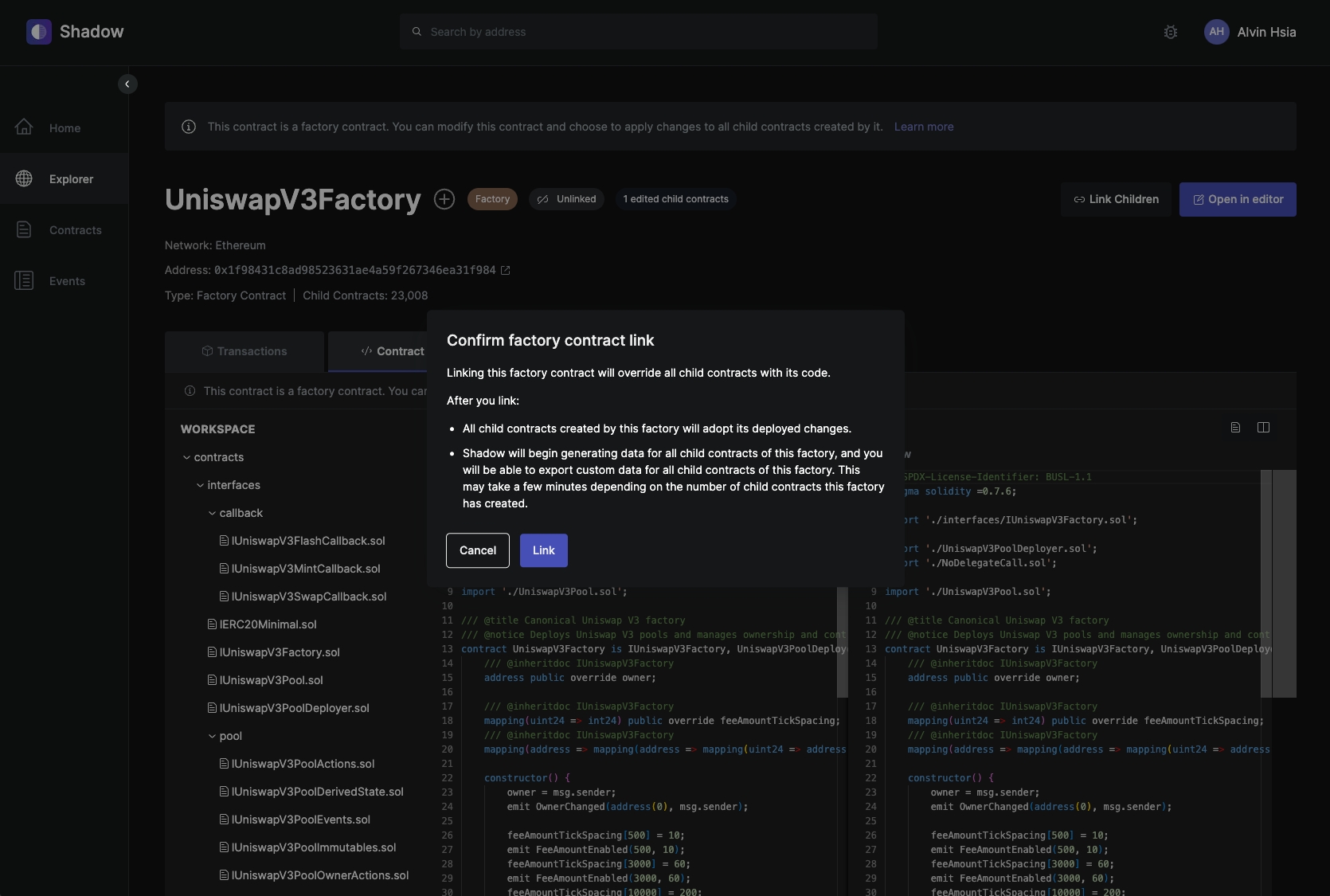
If you already have deployed changes to a factory contracts on your shadow fork, you can simply click the Link Children button from the factory contract page to link it with all of its children.
Once linked, any changes deployed to the factory contract will propagate to its child contracts; this includes all existing child contracts, as well as any child contracts deployed by the factory in the future.
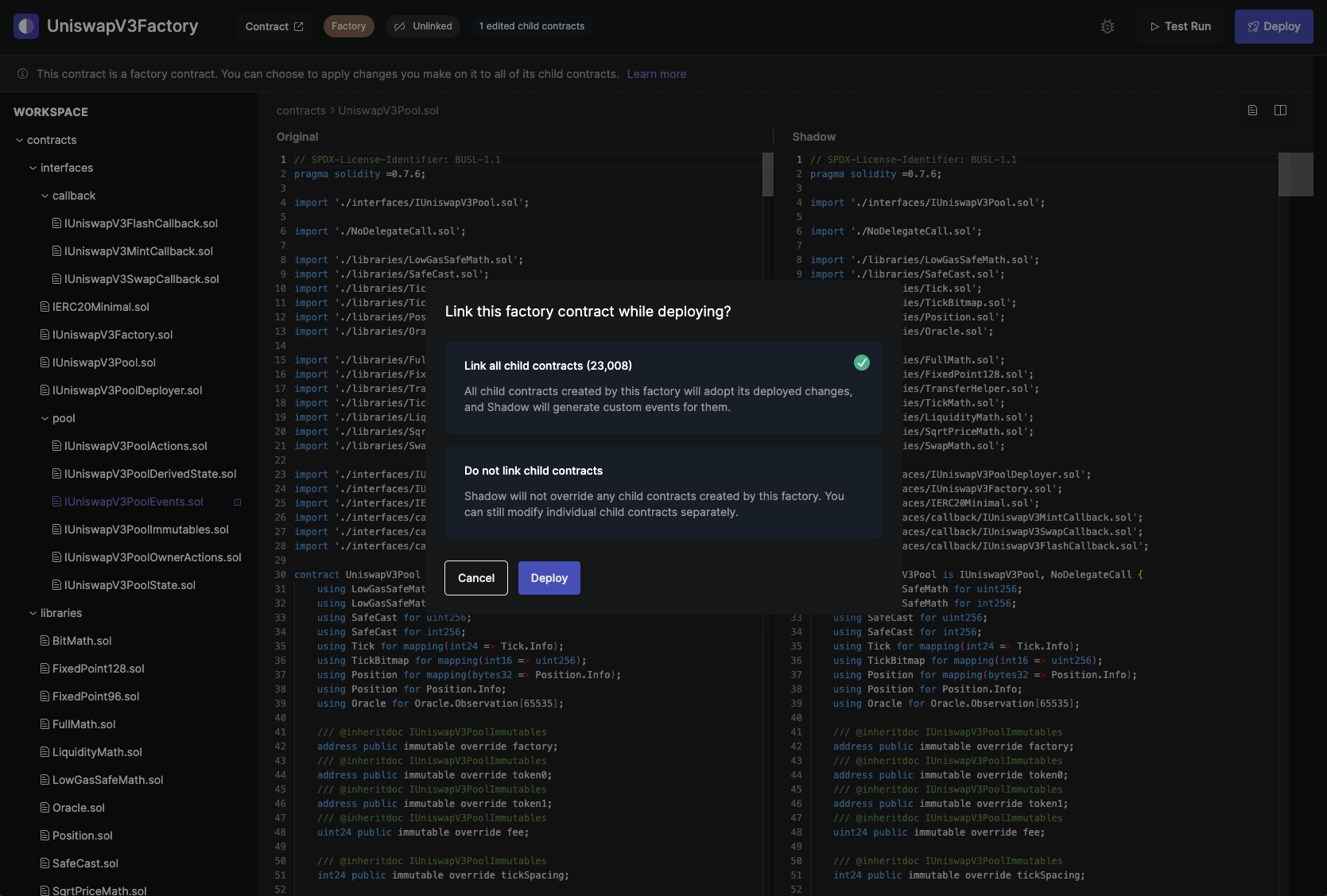
You can also link a factory contract to its child contracts from the Editor, while deploying changes.
A proxy contract is a smart contract that forwards transactions to another implementation contract containing the business logic. The proxy acts as an intermediary, allowing the implementation to be updated without changing the contract address users interact with.
For this example, we will be shadowing USDC to emit a custom event on every transfer. The custom event will be called TransferWithMetadata, and will contain additional metadata about the transfer, including the before and after balances, and the percent change.
USDC follows a proxy pattern with the following addresses:
Have the ability to link the changes made on the factory contract with all of its child contracts.
If linked, your changes will apply to all existing children, and any new ones deployed by the factory in the future.
See a total count of all the child contracts deployed by this factory contract
Implementation: 0x43506849d7c04f9138d1a2050bbf3a0c054402dd (as of Jul 2024)
Open the example on the Shadow Playground: https://app.shadow.xyz/demo?example=usdc_proxy
This will open the playground editor at the implementation contract at 0x43506849d7c04f9138d1a2050bbf3a0c054402dd (as of Jul 2024).
The bulk of the shadow contract changes lives in the FiatTokenV1.sol file.
At L57, we’ve defined the TransferWithMetadata event and a helper TransferMetadata struct:
Then lower down in the same file, we updated the _transfer function to emit our TransferWithMetadata shadow event:
Click “Compile” > “Test Run” in the top right corner, and paste in this transaction hash 0x8364a18d685976fd640a5ef24d9c8ef8a4eb25141d125ec87b642241dbedf853–– or you can simulate any other transaction that transferred USDC.
You should see your custom TransferWithMetadata in the output!
If you want to apply these changes on your shadow fork, click the button on the top right corner that says “Apply to your shadow fork”.
This will take you to the editor for your shadow fork, where you can deploy the changes by hitting “Compile > Deploy”.
Events added to an implementation contract are emitted by the proxy contract.
So if you want to see a realtime feed of your shadow events, you'll need to navigate to the proxy contract address 0xa0b86991c6218b36c1d19d4a2e9eb0ce3606eb48.
This means that if you are retrieving data via RPC, you'll need to filter by the proxy contract address.
Similarly, if you are setting up a data export, you'll need to select the proxy contract address.
User ---- tx ---> Proxy ----------> Implementation_v0
                     |
                      ------------> Implementation_v1
                     |
------------> Implementation_v2struct TransferMetadata {
uint256 balanceBefore;
uint256 balanceAfter;
int256 percentChange;
}
event TransferWithMetadata(
address from,
address to,
uint256 amount,
TransferMetadata fromMetadata,
TransferMetadata toMetadata
);function _transfer(
address from,
address to,
uint256 value
) internal override {
require(from != address(0), "ERC20: transfer from the zero address");
require(to != address(0), "ERC20: transfer to the zero address");
require(
value <= _balanceOf(from),
"ERC20: transfer amount exceeds balance"
);
uint256 fromBalanceBefore = _balanceOf(from);
uint256 fromBalanceAfter = _balanceOf(from).sub(value);
int256 fromPercentChange = -int256(value * uint256(10)**uint256(6) / fromBalanceBefore);
TransferMetadata memory fromTransferMetadata = TransferMetadata({
balanceBefore: fromBalanceBefore,
balanceAfter: fromBalanceAfter,
percentChange: fromPercentChange
});
uint256 toBalanceBefore = _balanceOf(to);
uint256 toBalanceAfter = _balanceOf(to).add(value);
int256 toPercentChange = int256(value * uint256(10)**uint256(6) / toBalanceBefore);
TransferMetadata memory toTransferMetadata = TransferMetadata({
balanceBefore: toBalanceBefore,
balanceAfter: toBalanceAfter,
percentChange: toPercentChange
});
emit TransferWithMetadata(from, to, value, fromTransferMetadata, toTransferMetadata);
_setBalance(from, _balanceOf(from).sub(value));
_setBalance(to, _balanceOf(to).add(value));
emit Transfer(from, to, value);
}Without Shadow, augmenting blockchain data with point-in-time accurate prices requires complex data pipelines and integrations with third-party price feed APIs. Shadow drastically simplifies this by allowing you to leverage existing oracle contracts, in <100 lines of code.
In this example, we’ll be updating the 1inch Aggregator contract to emit a shadow event called OrderFilledDetails that contains additional metadata of a trade, including the point-in-time USD price of the trade. We’ll be fetching the point-in-time prices via a Chainlink oracle.
Open the example on the Shadow Playground: This will open the playground editor at the 1inch Aggregation Router v5 contract on Ethereum at (as of Jul 2024).
At L4302, we’ve defined the OrderFilledDetails event and a helper OrderDetails struct:
At L4567, we call a new function called getOrderAmountUsd and emit the OrderFilledDetails event:
At the bottom of the contract at L4667, we define the getOrderAmountUsd function and two other helper functions:
Notice that we also pasted Chainlink’s AggregatorV3Interface into this file. This allows us to call the Chainlink oracle contract via its interface. You’ll have to do this any time you introduce shadow changes that interact with a contract interface that it doesn’t currently interact with.
Click “Compile” > “Test Run” in the top right corner, and paste in this transaction hash (or simulate any other order filled transaction).
You should see your custom OrderFilledDetails event in the output!
If you want to apply these changes on your shadow fork, click the button on the top right corner that says “Apply to your shadow fork”.
This will take you to the editor for your shadow fork, where you can deploy the changes by hitting “Compile > Deploy”
In this example, we’ll be making interdependent changes to Blur’s Blend and BlurPool contracts.
We’ll be making changes so that the BlurPool contract will emit a new shadow event TransferForLien every time some ETH in the pool gets transferred due to an action taken on a given lien (e.g. borrow, repay, refinance). The TransferForLien shadow event will include metadata about the lien.
Open the example on the Shadow Playground: , which will open the playground editor at the BlurPool contract.
In BlurPool.sol on L115, we’ve introduced a new function called transferFromForLien:
You can see the schema of the TransferForLien event in the IBlurPool.sol file:
If you want to apply these changes on your shadow fork, click the button on the top right corner that says “Apply to your shadow fork”. This will take you to the editor for your shadow fork, where you can deploy the changes by hitting “Compile > Deploy”.
Go to the following URL to open the Blend contract in the Shadow Playground for this example.:
In Blend.sol, you’ll see that we updated all BlurPool.transferFrom() call sites to call the new transferFromForLien function we added earlier.
Click “Compile” > “Test Run” in the top right corner, and paste in the following transaction hashes to see these shadow changes in action:
Borrow:
Repay:
Refinance:
You should see your custom TransferForLien event in the output for each transaction!
If you want to apply these changes on your shadow fork, click the button on the top right corner that says “Apply to your shadow fork”.
This will take you to the editor for your shadow fork, where you can deploy the changes by hitting “Compile > Deploy”.
function transferFromForLien(address from, address to, uint256 amount, uint256 lienId, Lien calldata lien, string calldata annotation) external returns (bool) {
    bool result = transferFrom(from, to, amount);
    emit TransferForLien(from, to, amount, lienId, lien, annotation);
    return result;
}event TransferForLien(
address indexed from,
address indexed to,
uint256 amount,
uint256 lienId,
Lien lien,
string annotation
);struct OrderDetails {
address maker;
address taker;
address makerToken;
address takerToken;
uint256 takerTokenFilledAmount;
uint256 makerTokenFilledAmount;
uint256 orderAmountUsd;
}
event OrderFilledDetails(OrderDetails orderDetails);uint256 orderAmountUsd = getOrderAmountUsd(order.makerAsset, order.takerAsset, actualMakingAmount, actualTakingAmount);
OrderDetails memory orderDetails = OrderDetails({
maker: order.maker,
taker: order.receiver,
makerToken: order.makerAsset,
takerToken: order.takerAsset,
takerTokenFilledAmount: actualTakingAmount,
makerTokenFilledAmount: actualMakingAmount,
orderAmountUsd: orderAmountUsd
});
emit OrderFilledDetails(orderDetails);function getOrderAmountUsd(address makerToken, address takerToken, uint256 makerTokenAmount, uint256 takerTokenAmount) internal returns (uint256 orderAmountUsd) {
if (takerToken == address(_WETH)) {
orderAmountUsd = takerTokenAmount * uint256(getPriceETH()) * 1e6 / 1e18 / 1e8;
} else if (makerToken == address(_WETH)) {
orderAmountUsd = makerTokenAmount * uint256(getPriceETH()) * 1e6 / 1e18 / 1e8;
} else if (isStable(makerToken)) {
orderAmountUsd = makerTokenAmount * 1e6;
} else if (isStable(takerToken)) {
orderAmountUsd = takerTokenAmount * 1e6;
}
bool isStable = isStable(makerToken) || isStable(takerToken);
}
function isStable(address token) internal returns (bool) {
if (
token == 0xA0b86991c6218b36c1d19D4a2e9Eb0cE3606eB48 || // USDC
token == 0xdAC17F958D2ee523a2206206994597C13D831ec7 || // USDT
token == 0x6B175474E89094C44Da98b954EedeAC495271d0F // DAI
) {
return true;
}
return false;
}
// Get the current price of ETH from Chainlink's ETH/USD oracle (8 decimals)
function getPriceETH() internal view returns (int256) {
AggregatorV3Interface dataFeed = AggregatorV3Interface(
0x5f4eC3Df9cbd43714FE2740f5E3616155c5b8419
);
(, int256 answer, , , ) = dataFeed.latestRoundData();
return answer;
}